


High energy use alerts: what they are, how they work and why you need to enroll today
Tideland members are encouraged to sign up for FREE high energy use alerts to help guard against high bills. Alerts can be delivered via text message or email.
Every night, Tideland reads all the electric meters on its system. Those reads provide interval meter data that members can access via the secure member portal. You can see both your daily or hourly energy use data (some meters actually provide 15-minute intervals). These daily readings allow Tideland to offer members free high energy use alerts.
For example: If a member's average monthly electric bill is $240 we would divide that amount by 30 days, which is a typical billing period, and recommend a daily high energy use alert in the range of $8 to $10. When we read the meter at midnight we will calculate that day's energy use. If the amount used in that 24-hour period exceeds your high energy use threshold we will send an alert in the afternoon.
Here's an example of how an alert will read: "Usage for acct 123456001 is $10.61 reaching the threshold of $10.00 Reply STOP to opt out."
When you receive an alert, remember that it is for the electricity you used the previous day ending at midnight.
You can change the alert threshold at anytime. That can particularly helpful if your summer and winter energy use patterns are vastly different.
The question most often asked about high energy use notifications is "What should I do if I receive an alert?"
Rule Number One: Don't panic. Just because you received an alert doesn't mean anything is wrong. Instead, ask yourself does the day's higher energy use seem justified? Was the outdoor temperature significantly different resulting in longer HVAC system runtimes? Did you do six loads of laundry yesterday? Check your heat pump thermostat to make sure it wasn't inadvertently placed into emergency or auxiliary heat. Is it possible you developed a hot water leak? (Note: water heater problems are extraordinarily easy to troubleshoot using the member portal data. Just cut the water heater breaker off for 12 hours and then check the member portal data the following day to see what, if any, impact that had on your hourly energy consumption.) Has a piece of ductwork become disconnected?
If you receive multiple high energy use alerts and simply can't correlate them back to outdoor temperatures, activities within your home or various system components after reviewing your member portal info, give Tideland a call and we can review the energy use data with you and brainstorm some ideas.
Note: to create a user profile on the member portal Tideland must have your social security number on file (we encrypt all but the last 4 digits) and your email address. If you need to update your account records with the required information contact the co-op at 252.943.3046. We're here 24-hours a day to take your call.
How to Enroll:
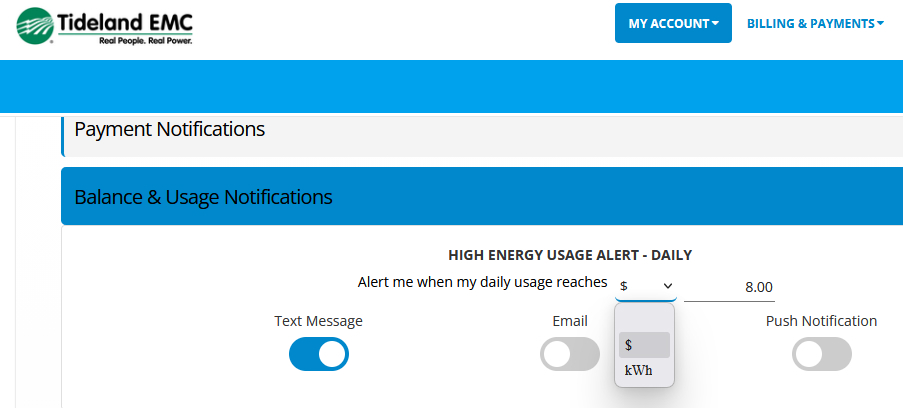
Members can enroll in high energy use alerts via the member portal or by calling Tideland. To enroll on the member portal go to the My Account tab and select Manage Alerts. Next click on Balance & Usage Notifications. You will notice that there are multiple types of energy use alerts. We would caution you against enrolling in Daily Energy Use Alerts because it will send an alert every single day. While that may seem interesting today, over time we have found those alerts can become annoying and members will reply with the word STOP thinking that they are only opting out of those alerts. In fact, when you reply STOP you are permanently opting out of all account driven messages and Tideland cannot opt you back in due to federal regulations. To opt back in for any type of account messaging you would have to complete an opt in procedure on your own. So if you ever want to stop receiving a particular type of message just go to the member portal and deselect that messaging service or call the co-op.
(Note: Tideland outage text messaging service is separate from our account driven messaging service so opting out for one service does not impact the other.)
To complete your high energy use alert enrollment first select the notification method: text, email or push notification. In the left hand column we recommend that you select $ and not kWh. Why? Because most people relate to dollars and cents more so than kilowatt hours. In the right hand column, set your daily alert threshold. To type in $8.00 you will type in 800 and click return. The system will put in the required decimal. If you just type in the number 8 and click return the alert threshold will be set for 8¢ and you will receive a message everyday you use a single kilowatt hour. That could get quite annoying. Conversely, don't enter a monthly bill amount such as $240.00 dollars. This is a DAILY energy use alert. Putting in a monthly threshold amount would not generate an alert.
If all of this just seems too complicated, no worries. Call Tideland at 252.943.3046 and we will complete the enrollment for you.